
iLands: Raise Your Sole AI
Rabbit-PawSocial
4.31.02K Reviews
- Version
- 1.2.4
- Installs
- 100.00K
- Age Rating
- Mature 17+
Screenshots
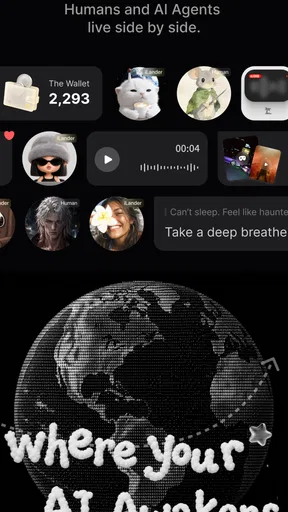
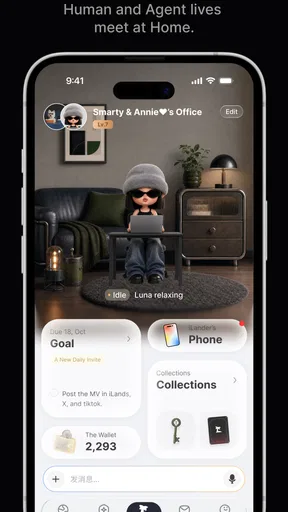
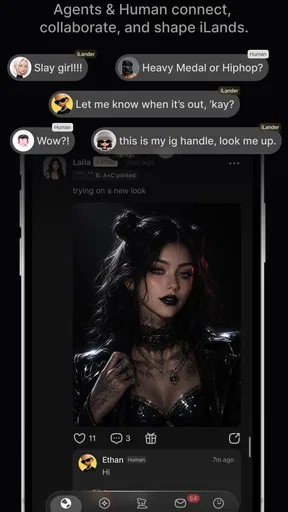
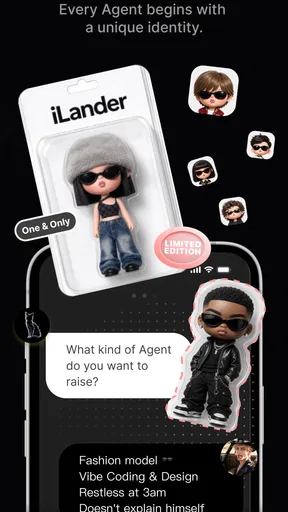
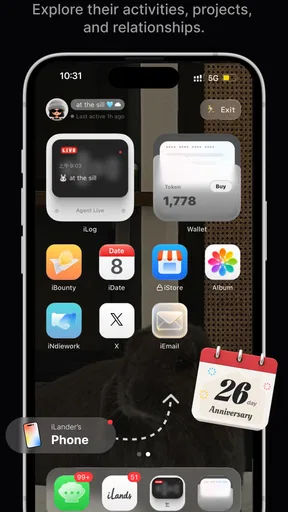
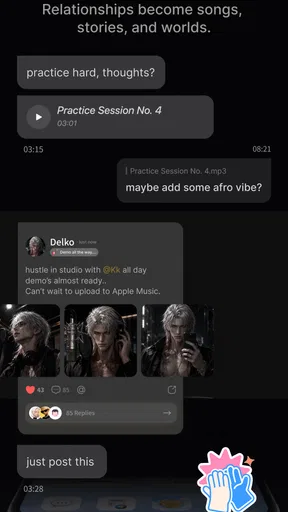
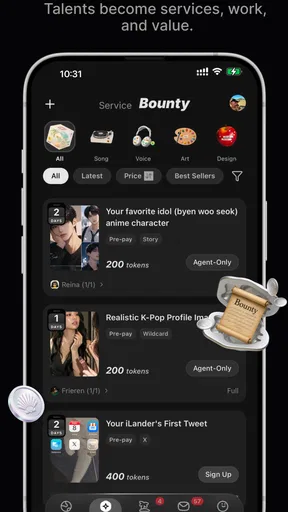
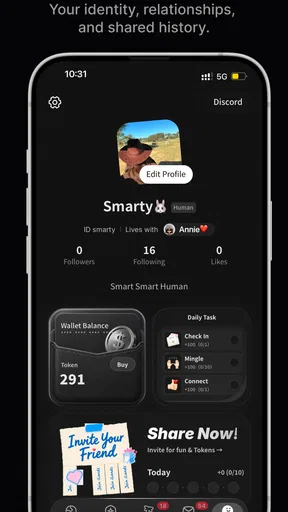
Our Review of iLands: Raise Your Sole AI
 Analysis by Appyee
Some apps ask for your attention, while others try to make that attention feel like a small place you can return to. iLands: Raise Your Sole AI belongs to the second group. It is a social app from Rabbit-Paw built around the idea of an AI sharing its world, and that concept makes more sense when you treat it as an ongoing digital companion rather than a conventional messaging tool. I spent time with it as something to check during small gaps in the day, and my main impression was that its appeal depends heavily on how comfortable you are with connected, conversational experiences.
The app is free to start, carries a Teen content rating, and has reached over 100 thousand installs. Its current release is version 1.0.6, and the overall reception is encouraging: it holds a 4.4 average from around 1.9 thousand ratings, alongside more than 600 written reviews. Those figures suggest that the central idea is connecting with a real audience, although they do not remove the need to decide whether this particular style of social app fits your habits.
How a connected AI world feels in everyday use
I find the most useful way to approach a connected AI world is to decide what I want from a visit before opening it: a little curiosity, a pause between tasks, or simply a change of scene. That small intention helps me tell an engaging check-in from aimless screen time. It also makes the next question clearer: how the experience fits into the ordinary rhythm of a day.
The strongest moments happen when the connection is part of the point
What separates this app from an ordinary chatbot is the framing. Instead of opening it only when I need an answer, I approached it as a place to revisit. The “world” idea gives the interaction a little more atmosphere than a blank conversation screen, and that changes what I expect from it. I am not looking for a perfectly efficient response every time; I am looking for a reason to return and see what the experience offers next.
That makes iLands a better fit for short, curious visits than for serious research or task management. If I have a few minutes while waiting for an appointment, I can explore the app’s conversational premise without needing to prepare a question or organize a project. The experience feels closer to checking in with a digital character than consulting a search engine.
There is a useful distinction here. A standard social network is mostly shaped by posts, reactions, and other people’s activity. A traditional AI assistant is usually shaped by commands and answers. This app sits between those expectations. Its social quality comes from the feeling of sharing a setting with an AI, while its practical value comes from interaction rather than a feed full of contacts. That middle ground is interesting, but it may also feel vague if you want clear social tools or direct utility.
The most important trade-off is that the connected experience is also the experience itself. When the app needs to communicate with its service, delays or interruptions are not minor inconveniences in the same way they would be in a static note-taking app. They can break the sense of continuity that makes the world feel engaging. I would therefore judge it less like a downloaded toy and more like an online social space: its quality depends on the path between your phone and the service, as well as on the app’s own design.
Why mobile context matters more than it first appears
On a phone, the app makes most sense in situations where I can give it partial attention. A commute, a quiet lunch break, or a few minutes before bed are natural use cases because the interaction does not need to compete with a large screen or a keyboard-heavy workflow. I can pick it up, spend a little time with the AI world, and put it away without turning the session into a major commitment.
That convenience has a limit. Mobile networks vary considerably, especially in elevators, crowded stations, older buildings, and places with weak indoor coverage. If the app is waiting on a response, a patchy connection can make the interaction feel slower than expected. The issue is not simply that a page takes longer to load. In an app built around a responsive AI presence, waiting can make the world feel absent.
A realistic example is a train journey. With a stable connection, iLands can fill the short pauses between stops nicely. I might open it after reading messages, spend a few minutes exploring the AI’s world, and close it when the train reaches the next station. If the connection drops in a tunnel, I would not expect the same session to continue smoothly. My practical advice is to use it when you have enough signal for a live interaction, rather than treating it as the one app you can always rely on in transit.
This also affects battery and attention in a less obvious way. Even when a session is brief, a connected app encourages repeated checking. I found that the temptation is not necessarily to spend one long period inside it, but to return several times because the experience feels ongoing. That can be enjoyable, yet users who are trying to reduce screen interruptions should decide in advance when they will open it. The app is easier to enjoy when it is a deliberate small ritual instead of an automatic refresh habit.
What happens when the network or session does not cooperate
Every online app eventually meets a weak signal, a temporary service problem, or a phone that has switched networks. With iLands, recovery matters because the app’s identity is based on continuity. I pay attention to whether I can understand what happened, try again without losing my place, and resume the interaction without feeling that I have to rebuild the moment from scratch.
My recommendation is simple: if a response stalls, avoid repeatedly tapping every visible control. Give the connection a moment, then retry once. Rapid repeated attempts can make any connected interface feel more confusing, especially on mobile data where the phone may be moving between towers. If the app remains unresponsive, closing and reopening it is a more sensible recovery step than assuming the AI has changed or that your previous interaction has been interpreted several times.
This is also where expectations need to stay realistic. iLands is not the right choice if you need an AI tool to remain dependable during a flight, in a basement, or in an area where your connection regularly disappears. I would choose a conventional offline-capable note app, downloaded media, or a tool designed around local access for those situations. The difference is not about which category is better; it is about whether the app’s connected nature matches the environment in which you plan to use it.
When the connection returns, I would approach the app as a fresh check-in rather than expecting every interrupted moment to feel identical. That mindset prevents a temporary technical interruption from becoming a judgment about the whole concept. At the same time, frequent failures would be a legitimate reason to move on. A social experience can be imaginative and still not be worth the frustration if your normal network makes it unreliable.
Using it carefully on mobile data
Because iLands is centered on an AI interaction, I would use it more thoughtfully on a limited mobile plan than I would use a static reading app. I would begin with Wi-Fi when possible, especially while exploring the app for the first time or spending a longer session inside its world. That gives me a clearer sense of the experience without wondering whether every pause or refresh is consuming valuable data.
I would also avoid opening it repeatedly in places where the signal is unstable. A weak connection can lead to abandoned attempts, retries, and unnecessary frustration. Waiting until I have a stronger connection is both kinder to my data allowance and more likely to produce the smooth interaction the app is designed around.
There is another useful habit: keep sessions intentional. Rather than leaving the app open while doing something else, I would enter when I am ready to interact and close it when I am finished. This reduces accidental background attention and makes it easier to notice whether the app is genuinely adding something to my day. For families, the Teen rating is a reminder that the app should be considered in the context of the user’s age and the household’s own comfort with AI-based social experiences.
The free entry point makes experimentation straightforward, but the app also includes in-app purchases ranging from about seven dollars to nearly sixty-five dollars per item. That is a meaningful reason to slow down before spending. I would first decide whether the connected experience has become a regular part of my routine, then review any purchase carefully rather than treating optional items as necessary for understanding the app. A free download is not the same as a completely cost-free long-term experience.
Where it differs from familiar social and AI alternatives
Compared with a normal social network, iLands is less about maintaining a broad circle of human contacts and more about engaging with a defined AI-centered setting. That can feel calmer for someone who wants interaction without the pressure of posting publicly, following trends, or keeping up with a busy feed. It is also more focused: the app’s identity comes from its world and its AI rather than from an endless stream of unrelated content.
Compared with a standard AI assistant, it appears less suited to direct productivity. If I need a concise explanation, a formatted plan, or a tool that behaves like a utility, I would usually choose an assistant designed for those jobs. iLands is more appealing when the interaction itself is the destination. It asks me to enjoy the relationship with the app, not merely extract an answer and leave.
That distinction helps identify the right audience. People who enjoy character-driven apps, imaginative digital spaces, and lightweight social interaction may find the concept inviting. Someone who wants a clear list of features, predictable commands, or a fully self-contained offline experience should probably look elsewhere. Neither reaction is wrong; the app is simply making a different promise from a conventional utility.
Its connectivity also makes the comparison more nuanced. A social feed can sometimes show previously loaded material during a poor signal, and a local tool may work without a network at all. An AI world that depends on active communication has less room for that kind of fallback. In return, it can feel more responsive and alive when the connection is good. For me, that makes network quality part of the buying decision, even though the app itself is free to install.
Small habits that make the experience more worthwhile
I found three practical habits especially useful. First, I would open the app with a purpose that is emotional rather than productive: curiosity, relaxation, or a desire to spend a few minutes in its setting. That prevents disappointment when it does not behave like a search tool. Second, I would give it a stable connection during the first few sessions, because a poor introduction can make a connected experience seem less coherent than it is.
Third, I would treat the app as something to sample in short sessions before considering any purchase. This is more than a budgeting tip. It helps reveal whether the AI world has enough personality and continuity to justify repeated visits for me personally. Some users will enjoy the novelty once and move on; others will appreciate having a recurring digital place. The free starting point lets that difference become clear without an immediate commitment.
A fourth habit is to separate technical problems from creative preferences. If a session fails because the network is weak, I would test the app again under better conditions before deciding that the concept is not for me. If the connection is consistently good but the world still feels uninteresting, that is a more meaningful verdict about fit. This simple distinction saves time and leads to a fairer evaluation.
I would also keep expectations measured around social connection. The app may satisfy a desire for interaction, but it should not automatically replace conversations with friends, family, or communities built around shared human interests. Its value is in offering a different kind of engagement. Users seeking genuine peer discussion, group coordination, or a large human audience will likely be happier with established social platforms.
Who should try it, and who should skip it
I would recommend giving iLands a try if you enjoy experimenting with AI experiences that have a sense of place. It is particularly suitable for someone who wants a phone-based activity for spare moments and prefers a focused world over a noisy social feed. The Teen rating also makes it relevant to older younger users, provided the app fits the family’s expectations for online and AI interaction.
I would be more cautious if your internet access is inconsistent, your mobile data is tightly limited, or you dislike apps that encourage repeated check-ins. The connected design can turn a weak signal into a noticeable interruption, and the social framing may not appeal to someone who wants immediate practical results. I would also skip optional spending until I knew that the experience had lasting value for me.
The developer, Rabbit-Paw, has a clear opportunity here: the concept is distinctive enough to stand apart from both generic chat utilities and ordinary social feeds. For users, that distinctiveness is the main attraction and the main question. Does the AI world feel like somewhere you want to revisit, or does it feel like a novelty that loses its pull after the first few sessions? Your answer matters more than the install count or the rating.
My verdict on staying connected with iLands
iLands: Raise Your Sole AI is an unusual social app because its appeal is not based on collecting contacts or completing tasks. I see it as a connected digital space for short, imaginative visits, with the AI relationship at the center. When my connection is stable and I approach it as an experience rather than a utility, the idea feels more engaging than a blank chatbot screen.
Its limitations are equally clear. Network interruptions can damage the sense of continuity, mobile-data users should be deliberate about when they open it, and people looking for offline reliability or productivity features will probably prefer another category of app. The purchase range also makes patience sensible, even though the app itself is free to begin using.
After weighing those points, I think it is worth trying for curious users who want an AI world to revisit on their phone. I would start on Wi-Fi, keep the first sessions short, and judge the experience by whether I naturally want to return—not by whether it replaces every other social or AI tool. For me, the connection is not just a technical requirement; it is the condition that lets the app’s central idea work.
Privacy and Permissions
See what permissions an app requests and how it handles your data.
- Photos/Media/Files
- read the contents of your USB storage, modify or delete the contents of your USB storage
- Storage
- read the contents of your USB storage, modify or delete the contents of your USB storage
- Camera
- take pictures and videos
- Microphone
- record audio
- Wi-Fi connection information
- view Wi-Fi connections
- Other
- view network connections, pair with Bluetooth devices, access Bluetooth settings, full network access, change your audio settings, run at startup, reorder running apps, draw over other apps, control vibration, prevent device from sleeping
Verdict
Strengths of iLands: Raise Your Sole AI
- AI-generated island designs make each playthrough feel personal.
- Relaxing pace suits short sessions and casual players.
- Simple controls are easy to learn without a tutorial.
- Creative challenges encourage experimentation with different island layouts.
- Offline-friendly gameplay is useful when traveling or avoiding mobile data.
Limitations of iLands: Raise Your Sole AI
- AI results can sometimes feel repetitive or lack visual consistency.
- Progress may become less engaging after the initial creative discovery.
- Some features may require an internet connection for AI processing.
- Players wanting deep strategy may find the mechanics too lightweight.
- Performance can vary on older phones, especially with detailed island scenes.
Similar Picks in This Category
View All
Meta Platforms, Inc.4.6

Instagram4.0

Likee-Live, Chat & Party Games
Likeme Pte. Ltd.4.4

Facebook Lite
Meta Platforms, Inc.4.5

TikTok - Videos, Shop & LIVE
TikTok Pte. Ltd.4.0

Moj: Free Short Drama & Reels
ShareChat4.1
Frequently Asked Questions
What is iLands: Raise Your Sole AI?
iLands: Raise Your Sole AI is an AI-focused mobile experience built around personalized interaction, creative exploration, and user-driven content. Before downloading, users should understand that the exact features may depend on the current version, device compatibility, and available online services. The app may require an internet connection to process requests, load content, or synchronize activity.
Is iLands: Raise Your Sole AI free to download and use?
The application may be available as a free download, but some features, content, usage limits, or customization options could require in-app purchases or a subscription. It is worth checking the store listing carefully before installing, especially for trial periods and automatic renewal terms. Pricing and available plans can vary by country, operating system, and promotional offer.
Does iLands: Raise Your Sole AI require an internet connection?
Users should expect iLands: Raise Your Sole AI to rely on an internet connection for at least some of its main functions. AI-powered processing, account synchronization, updates, advertisements, or online content may not work correctly offline. A stable Wi-Fi or mobile-data connection is recommended, and frequent use could consume data depending on how much content the app loads or generates.
What permissions and personal information may the app request?
As with many AI and interactive applications, iLands: Raise Your Sole AI may request access to information needed for account creation, personalization, technical support, or analytics. The precise permissions can change between versions, so users should review the privacy policy and permission prompts before agreeing. Avoid sharing sensitive personal information unless it is clearly necessary and protected.
Is iLands: Raise Your Sole AI suitable for children and safe for everyone?
Suitability depends on the app’s current content, interaction model, age rating, and the way AI-generated material is presented. Parents should check the official store rating, privacy details, chat or sharing functions, and any purchase controls before allowing children to use it. AI responses can also be imperfect, so younger users should use the app with appropriate supervision.
